
Data normalization
Data normalization helps you view your sustainability data in a consistent and comparable way. It adjusts for factors such as occupancy levels and weather conditions, so you can better understand the true performance of your buildings. Normalization is carried out through several steps that take place before and after data gap estimation (DGE). Each step applies a specific type of adjustment to your data.
Data normalization consists of four sub‑modules:
Vacancy normalization (before DGE)
Vacancy denormalization (after DGE)
Weather normalization (after DGE)
Weather and vacancy normalization (after DGE)
Data normalization options are available directly in the platform within the filter section across several sustainability dashboards, such as Energy data coverage, Resources and emissions. You can switch between normalization options at any time to view the version of the data that best supports your analysis.
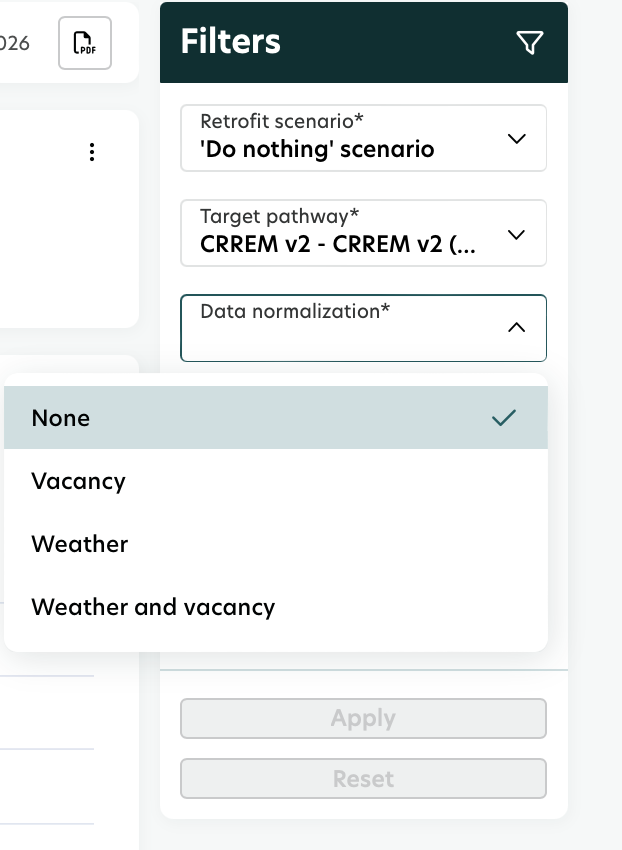
“None” in the Data normalization control means that the data is shown in its original, non‑normalized form.
Data normalization sub-module
In the following sections, you’ll find an overview of each normalization sub-module, including what it does and why it’s applied. This helps you understand how the system adjusts your data at different stages of the calculation process.
1. Vacancy normalization
Vacancy normalization adjusts energy consumption data based on the vacancy rate of a building.
The vacancy rate represents the percentage of usable space that is unoccupied or not in use during a specific period. By applying vacancy normalization, the energy data reflects only the areas that were actually occupied and consuming energy.
When energy consumption is reported at the whole‑building level, the data may include areas that were vacant and therefore not consuming energy. Vacancy normalization helps ensure that the data more accurately represents real usage. It is used to:
Provide a more realistic split of energy consumption.
Enable fair energy comparisons between different buildings.
Separate the impact of retrofits from the impact of vacancy on energy consumption.
Vacancy normalization is also a prerequisite for running plausibility checks and performing data gap estimation. For this reason, it takes place before the other data normalization sub‑modules.
2. Vacancy denormalization
Vacancy denormalization simply reverses the adjustment that was applied during vacancy normalization.
There is no additional business logic involved - the purpose is only to bring the data back to its original state after estimation.
Vacancy denormalization is applied when the Data normalization setting in the filter section is set to None.
This ensures that you can switch back to the non‑normalized view whenever needed.
To understand why data normalization comes first and denormalization follows, see the explanation below.
During energy data estimation, the process starts by assuming 100% occupancy.
This is required because benchmarks and standardized methodologies (such as EPCs) are based on fully occupied buildings. Once the estimation is completed based on this assumption, vacancy denormalization is applied to reflect the actual vacancy rate of the building.
This ensures that the final values match real conditions while still allowing the estimation to use a consistent reference point.
3. Weather normalization
Weather normalization adjusts energy consumption data to isolate the impact of weather conditions. It is typically applied only to heating data, since electricity use is usually not significantly affected by temperature changes.
Weather conditions, especially temperature, can strongly influence a building’s overall energy usage, with the strongest impact seen in heating demand. Weather normalization helps ensure that energy performance reflects efficiency, not weather fluctuations. It is used to:
Ensure fair comparison of a building’s energy performance over time, regardless of varying weather conditions.
Provide standardized performance values, that are more reliable for benchmarking and tracking improvements.
Support calculation of metrics such as Energy Use Intensity (EUI).
Offer a clearer understanding of building efficiency and help identify improvement opportunities.
4. Weather and vacancy normalization
Weather and vacancy adjustments can be applied together.
This combined option applies both normalization steps, and there is no additional or separate business logic beyond the individual modules.