
Building ESG Insights
The Building ESG Insights report is designed for two main roles: Property Managers and Sustainability Managers.
As a Property Manager, you typically oversee the operational aspects of buildings and need a clear view of data completeness to make sure all relevant ESG information is captured for your properties.
As a Sustainability Manager, your focus is on improving ESG performance across the portfolio. You use this report to identify gaps in data quality and completeness, helping you prioritize actions that strengthen sustainability reporting and meet corporate or regulatory standards. The goal of this feature is to give you a centralized, easy-to-use report that consolidates ESG-related building data from multiple sources. By presenting this information in a structured and interactive format, the report helps you make informed decisions, improve data integrity, and drive sustainability initiatives effectively.
Data Source
The Building ESG Insights report is built on a common data model approach, which integrates and consolidates multiple streams of information across the platform. This includes essential building master data, detailed area measurements, Energy Performance Certificates (EPC), green building certifications, and ESG-specific building data.
By combining these diverse datasets into a unified structure, the report ensures consistency and transparency. All information is presented in a tabular format, making it easy for you to review, compare, and analyze data
completeness across your portfolio.
Access the report
Click the Data insights icon in the left-hand menu.
Select Building ESG insights under Overview, and the report will open automatically.
Filters in the report
You can adjust what data is shown in the report using filters in the top bar of the platform.
1. Portfolio filter
Use this filter to choose which part of your portfolio you want to analyze.
You can select:
Regions, countries, or buildings (based on geography or custom structure)
Building attributes like type, ownership, or status
2. Building dropdown
Use this dropdown to select one or more buildings for detailed analysis.
Visualizations and Insights
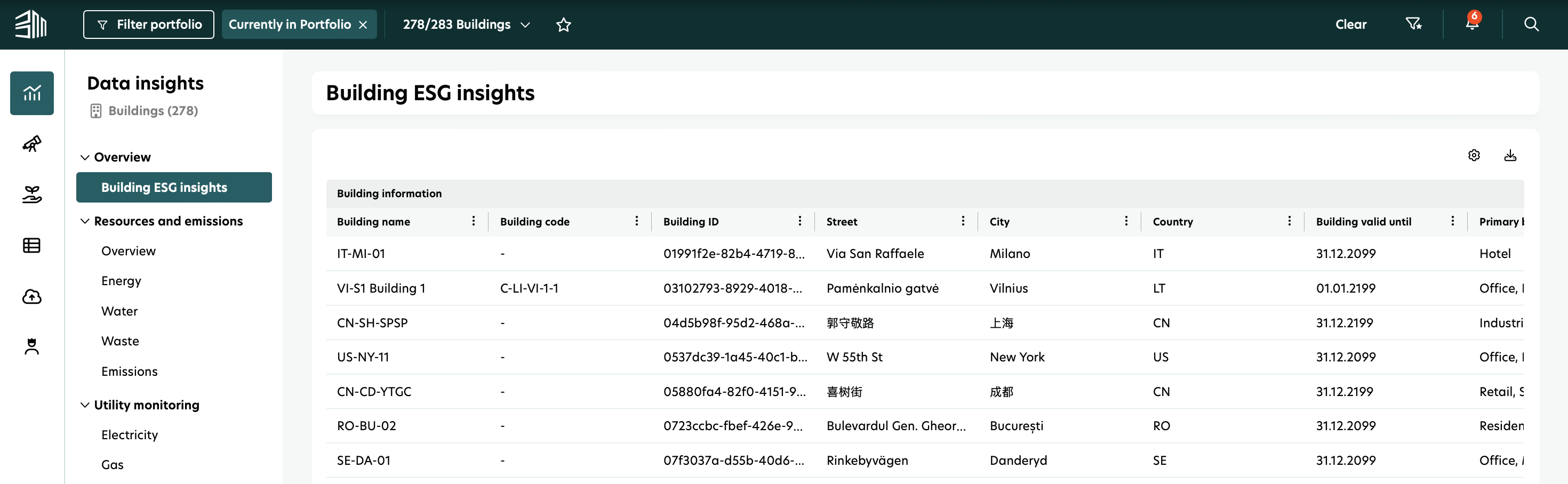
Below is an overview of all columns included in this report, along with their descriptions.
Column name | Description |
|---|---|
Building name | User specific building name e.g: EMEA Headquarter, Office Berlin |
Building code | User specific building code |
Building ID | Unique building identifier ID coming from user |
Street | Name of the street where building is located |
City | Any official settlement including cities, towns, villages, hamlets, localities, etc |
Country | Sovereign nations and their dependent territories, anything with an ISO-3166 code |
Building valid until | Date confirming building ownership or inclusion in asset records |
Primary building type | Main functional category of the building (e.g., office, residential, industrial) |
Contruction year | Year of original construction |
Final building permit application | The date when the construction permit for the building was granted |
Expected life end date | The expected end date of the building's lifecycle |
Parking spaces | Number of parking spaces |
Electric vehicle charging station | Number of electric vehicle charging stations |
Total gross floor area | The total floor area of the building, measured to the external face of the external walls |
Total gross internal area | The total area of a building measured to the internal face of the perimeter walls at each floor level |
Primary water type | The building’s primary water type stored in the Building Information |
Primary heating source | Stores information about the building’s main heating system in the Building Information (e.g., heat pump, natural gas, district heating) |
Secondary heating source | Stores information about the building’s secondary or supplementary heating system in the Building Information (e.g., heat pump, natural gas, district heating) |
Air conditioning | Stores information in the Building Information about whether the building has air conditioning and its type. Cooling systems can significantly impact energy use and greenhouse gas emissions |
Fossil fuel exposure | Stores information in the Building Information about whether the building is used for fossil fuel extraction, storage, transport, or manufacturing. This supports the EU Taxonomy's 'Do No Significant Harm' principle and aligns with SFDR adverse impact indicators |
Average Annual Valuation | Building valuation stored in the valuation table - shows the average value if valuations are uploaded quarterly |
Valuation unit | Unit of the valuation for e.g euros, dollars etc |
HVAC system over 290 | Indicates whether the building has an effective heating, cooling, or ventilation (HVAC) system with a capacity over 290 kW |
Efficiently operated | Indicates whether the building has systems to monitor and assess energy performance for optimal operation and efficiency. This can be shown through an Energy Performance Contract or a building automation system in line with Directive 2010/31/EU |
NZEB status | Indicates whether the building is a nearly zero-energy building (NZEB), meaning it has very high energy performance and requires minimal energy for operations, mostly from renewable sources. It meets national NZEB thresholds under EU Directive 2010/31/EU |
Building not dedicated to fossil fuel | Indicates whether the building is not used for fossil fuel extraction, storage, transport, or manufacturing. This supports the 'Do No Significant Harm' principle in the EU Taxonomy and aligns with SFDR adverse impact indicators |
Air tightness testing | Indicates whether the building has an air-tightness testing process implemented. This verifies the building envelope’s ability to prevent air leakage, which is essential for energy efficiency |
Thermal integrity testing | Indicates whether the building has thermal integrity testing implemented to assess insulation performance and minimize heat loss. This supports compliance with EU Taxonomy criteria for climate change mitigation |
Quality control process | Indicates whether the building has a documented quality control process to ensure construction quality, especially thermal performance. This process can substitute for thermal integrity testing under EU Taxonomy if it is robust and traceable |
Global warming potential | Indicates whether a Global Warming Potential (GWP) assessment has been conducted for the building. This measures total greenhouse gas emissions over the building’s life cycle. Disclosure of GWP is mandatory under EU Taxonomy for large buildings (area > 5,000 m²). |
Number of energy rating certificates | Total number of valid EPCs available for the building |
Energy class | Represents the building’s energy efficiency rating class (e.g., A+++ to G). Higher classes (A or B) are often required for EU Taxonomy alignment and are favorable under SFDR |
Certificate type | Type of Certificate e.g: LEED, BREEAM, DGNB |
Reporting type/assessment level | Specifies how EPC data is reported - whether the EPC is based on energy consumption or energy demand |
Object type | Specifies the object the EPC applies to - whether it covers the entire building or only part of it. This is important for understanding the scope of energy performance data |
Status | Indicates whether the EPC is valid, expired, or requires recertification. Only valid EPCs are considered for EU Taxonomy and SFDR disclosures |
Energy reference area | Indicates the associated area (in m²) used to calculate the energy rating. This usually represents the conditioned/heated area and differs from gross floor area or gross internal area. Ensures consistency and comparability of EPC results |
Area | Shows the proportion of a building or portfolio area covered by valid Energy Performance Certificates (EPCs). High coverage supports transparency and completeness in sustainability reporting |
Area type | Specifies the type of available area in real estate, such as gross floor area, gross internal area, or energy reference area |
Property type | Specifies the property type (e.g., residential, office, retail). This is the same as the primary building type from the Building Information section and is relevant for determining applicable energy performance thresholds under EU Taxonomy |
Final energy demand | Represents the final energy value, which is the energy consumed at the building/end-user meter. Depending on the selected 'ReportingType', this value reflects either consumption or demand |
Primary energy demand | Represents the primary energy value, which is the energy consumed at the source (raw fuel), including losses during generation, transmission, and distribution. Depending on the selected 'ReportingType', this value reflects either consumption or demand |
Total energy efficiency | Compares the building’s calculated energy consumption to that of a standardized reference building. In Austrian Energy Performance Certificates (EPC), it is usually referred to as fGEE |
Electricity | The final energy value for electricity. Depending on the selected 'ReportingType', this value indicates either consumption or demand |
Heating | The final energy value for heating. Depending on the selected 'ReportingType', this value indicates either consumption or demand |
Cooling | The final energy value for cooling. Depending on the selected 'ReportingType', this value indicates either consumption or demand |
Carbon emission | Total carbon emission value |
Heating source | Specifies the heating energy source (e.g., natural gas, electricity, biomass, district heating). Using fossil-free sources supports EU Taxonomy compliance and helps reduce negative SFDR impacts |
Valid from | Indicates the date from which the energy performance certificate is valid |
Valid until | Indicates the date until which the energy performance certificate remains valid |
Evidence | The PDF or documentation file that validates and details the EPC (e.g., official reports or third-party audits). It is essential for verification and due diligence, and it strengthens the credibility of sustainability claims |
Total number of certificate | Total number of valid green building certificates available for the building |
Certificate type | Type of Certificate (e.g., LEED, BREEAM, DGNB, WELL, HQE, MINERGIE, WIREDSCORE) |
Reporting type | This field varies by certificate type. For example, WELL offers options such as WELL Certification, WELL Core, and WELL Rating |
Level | Indicates the rating level achieved within the certification scheme (e.g., Gold, Silver, Bronze, Certified). Each certification has its own rating scale and scoring system. Higher levels reflect stronger sustainability performance |
Score | The numerical score achieved during certification, showing how the building performs against the scheme’s criteria. It can be expressed in points or as a percentage. This score offers a more detailed view than the rating level alone and is useful for benchmarking and continuous improvement |
Application date | The date when the certification process started. If an 'Application date' is provided, it serves as the starting validity date. Otherwise, the 'Valid From' date is used |
Certificate Valid From | The date when the certificate becomes valid. Ensures the certification is current and applies to the reporting period. Records can be used starting from this date |
Certificate Valid Until | The certificate’s expiry date. Indicates when recertification is required to maintain compliance. Only valid certificates are typically accepted in sustainability reporting. Records can be used until this date |
Certificate Evidence | The PDF or documentation file that confirms the validity and details of the certification (e.g., official reports or third-party audits). It is essential for verification and due diligence and strengthens the credibility of sustainability claims |
Primary electricity source | Stores the building’s primary electricity source in the Building Information. Refers to the main energy source used (e.g., electricity, gas, district heating) |
Primary water type | Stores information about the building’s main water supply source in the Building Information (e.g., municipal, rainwater harvesting, groundwater) |
Gross asset value | Represents the building’s valuation stored in the valuation table. If valuations are uploaded quarterly, this shows the average. Indicates the property’s average annual market value or gross asset value |